Panels Advanced security

In the Advanced security panel, you can make settings for X-Frame-Options. Here you can read more about X-Frame-Options. External link, opens in new window.

This setting is about protecting oneself against someone else including your content in an IFRAME. This can be a potential security risk in the form of clickjacking.
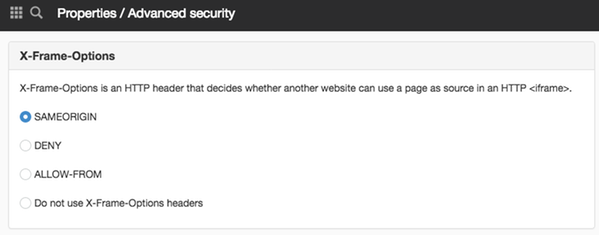
X-Frame-Options

  • SAMEORIGIN - If you allow X-Frame-Options for the same domain
  • DENY - Does not allow X-Frame-Options
  • ALLOW-FROM - To specify the IP address to which you want to allow X-Frame-Options
  • Do not use X-Frame-Options headers - If you do not want to use this setting at all.

CORS

Cross-Origin Resource Sharing (CORS) is a mechanism that uses additional HTTP headers to instruct browsers to grant a web application running on one origin access to selected resources from another origin.

  • Do not allow from any domain - Check this box if you do not want to allow CORS.
  • Allow from all domains - Check this box if you want to allow CORS from all domains
  • Allow only for specified domains - Check this box if you want to allow CORS for specific domains. You can then specify the allowed domains here.

When you create a new object (page, article, file, etc.), the new object automatically inherits the parent's CORS settings.

However, after creation, there is no CORS dependency between the objects. In other words, the parent and child have completely separate settings that remain in effect until they are explicitly changed.

Update Subpages/Files

If you enable CORS for a folder, you can click the "Update Sublying Pages/Files" button to update the files/pages located within that folder so that all of them inherit this setting.

This function requires you to have "Manage developer functions" permission

The Advanced Security panel can be found under the following items:

  • Properties on the page
  • Properties on a group page
  • Properties on a structure page
  • Properties on an archive
  • Folder Properties
  • File/Image Properties

The page published:

Did the information help you?

help.sitevision.se always refers to the latest version of Sitevision