The File Settings Panel

File archive
Use local file archives on pages
Check this box if users should have access to Files on the page. They can then upload a file to a web page. Otherwise, they must upload documents to the central file archive.
Use local image archives on pages
Check this box if users should have access to Images on the page. They can then upload an image to a web page. Otherwise, they must upload images to the central image archive.
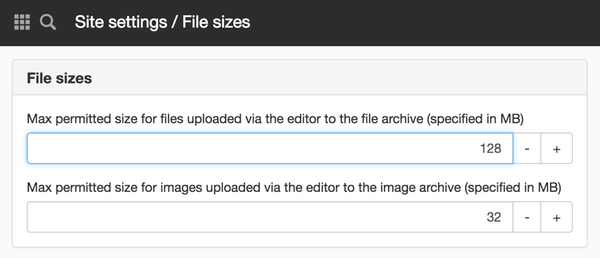
File sizes
Max. permitted size for files uploaded via the editor to the file archive
Here you set a file size limit that is uploaded via the editor to the file archive. The default setting is 128 MB.
Max. permitted size for images uploaded via the editor to the image archive
Here you set an image size limit that is uploaded via the editor to the file archive. The default setting is 32 MB.
File download
Today, Sitevision is quite forgiving when it comes to how images and other resources are delivered.
This means that several different URLs can display the same image – even if the file name does not match exactly. To make management more accurate, there is now a new setting:
Use strict file name control
When you select this check box, the image is only retrieved if the URL exactly matches the file name.
This is useful if you want to ensure that the correct file is always loaded, especially when several files may have similar names or versions.
Image permissions
Check image permissions
This setting can be found under website settings/security/file settings. There is a checkbox at the bottom. Tick it if you want to enable permission checks for images.
Only applies to websites older than version 2024.04.2 2
This function requires you to have "Manage website settings" permission
The page published:
help.sitevision.se always refers to the latest version of Sitevision
Print page