

Quick guide Get news with RSS
You can retrieve news from external sources using RSS. RSS stands for Rich Site Summary and is a standard format for transferring news headlines on the web. Sitevision can retrieve data from an external RSS source that is automatically updated when new news arrives. This allows you to easily update your website with the latest news.
RSS versions 0.94, 1.0, and 2.0 are supported in Sitevision.
This guide describes how to set up a news feature with news from The Daily. Two steps are required for this functionality:
1. Set up RSS source(s) on the website
2. Post a news module that displays the RSS source
Step 1: Set up RSS sources on the website
To set up a new source, you must have the address of the RSS source.
1. Select Website settings -> Integration category and the RSS panel.
2. Click on the Add RSS source link. A new view will appear:

- Name - Enter a name here that you will then use in the news module (step 2).
- Address - Enter the address you copied here.
- Time interval - Here you set how often you want the news to be updated. The default setting is every five minutes.
Click OK. If you want to set up more sources, click the Add RSS source link again.
This requires that you have the Manage site settings permission .
Step 2: Add a news module
1. Select the News module on the page where you want the news to appear.
2. Under Show articles from, click the Add link . A new view appears. Select Source RSS at the top. A list of the RSS sources you have set up on the website will then appear. Select the source you want to display and click OK.

3. Under the Restrictions tab, check the box Restrict number of visible itemsand select the number using the plus/minus button. The default setting is 10 items. We will enter 5.

4. Under the Content tab, you decide how the content should be displayed on the page.
Remove any content you do not want to display. Select the relevant row and click on the cross on the far right to delete the row.

In this case i only kept :
Select Publish date in the list and double-click or click the edit icon on the right. We change the format template for Publication date.
Select Article title in the list. We change the format template for Article title and check the box to link the heading to the article.

Select Article abstract in the list. Check the box to "Crop if too many characters in text" and choose 100 characters.

Click OK and publish the page. The result will be news from The Daily that is updated every 30 minutes:
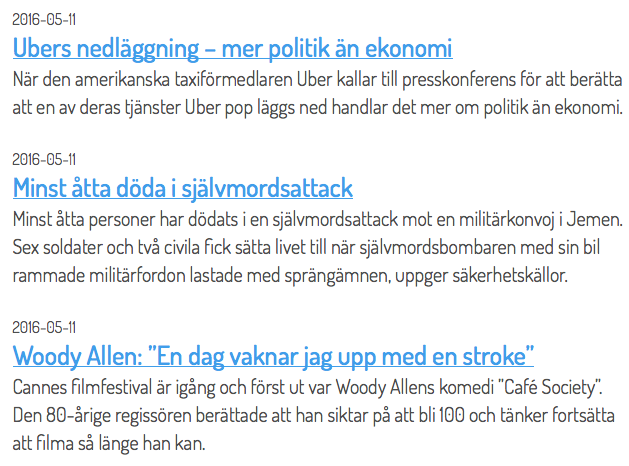
The page published:
 Print page
help.sitevision.se always refers to the latest version of Sitevision