

Status
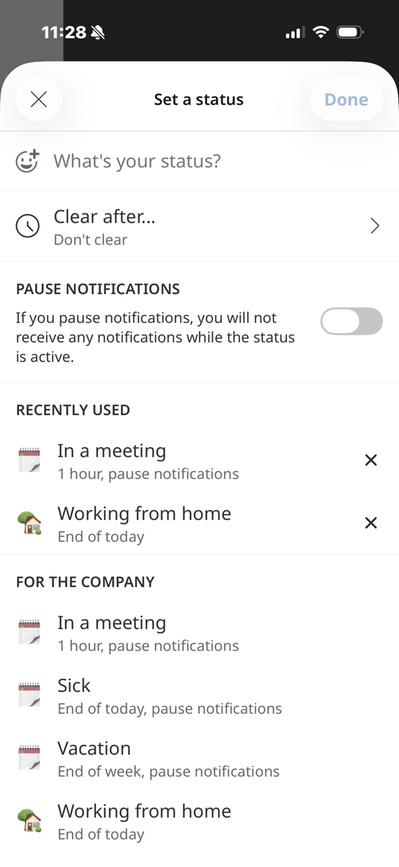
Set a status
What's your status?
Here you can enter your own status. You can write your own text to be displayed. For example, "Done for the day"
Clear after...
Here you can choose when the status should be cleared. The following options are available:
- Don't clear
- 30 minutes
- 1 hour
- 4 hours
- End of the day
- End of the week
- Custom—you can enter the date and time when you want the items to be cleared.
Pause notifications
Here you can choose to enable paused notifications if you’ve posted a status update. Notifications will remain paused until the status is cleared.
Recently Used
This shows the statuses you’ve recently used, if you’ve used any.
For your website
Here you can choose from a list of common statuses. The following four status templates are included by default:
- In a meeting—set for one hour; notifications for
- Sick—set until the end of the day, notifications for
- On vacation—set until the end of the week, notifications for
- Working from home—set until the end of the day
However, you can also modify these status templates or add your own under website settings. If you add more status templates, they will appear in the list.
The page published:
 Print page
help.sitevision.se always refers to the latest version of Sitevision