

help.sitevision.se always refers to the latest version of Sitevision
The E-plikt Panel
On the 1st July 2012, the Swedish Legal Deposit Act of Electronic Material (e-plikt) came into force. It applies to electronic material made available after 31st December 2014. Here you can read more about who and what the e-plikt applies to. External link, opens in new window.
In SiteVision there is now built-in support for e-plikt with automatic reporting to the National Library of Sweden. The publishing dialogue has been expanded with a new checkbox where the editor has the option to select whether or not to archive a specific page. These pages are then automatically delivered to the National Library of Sweden via an RSS-like format.
This function is included at no cost to public sector customers but requires a separate license that can be obtained via SiteVision Support.
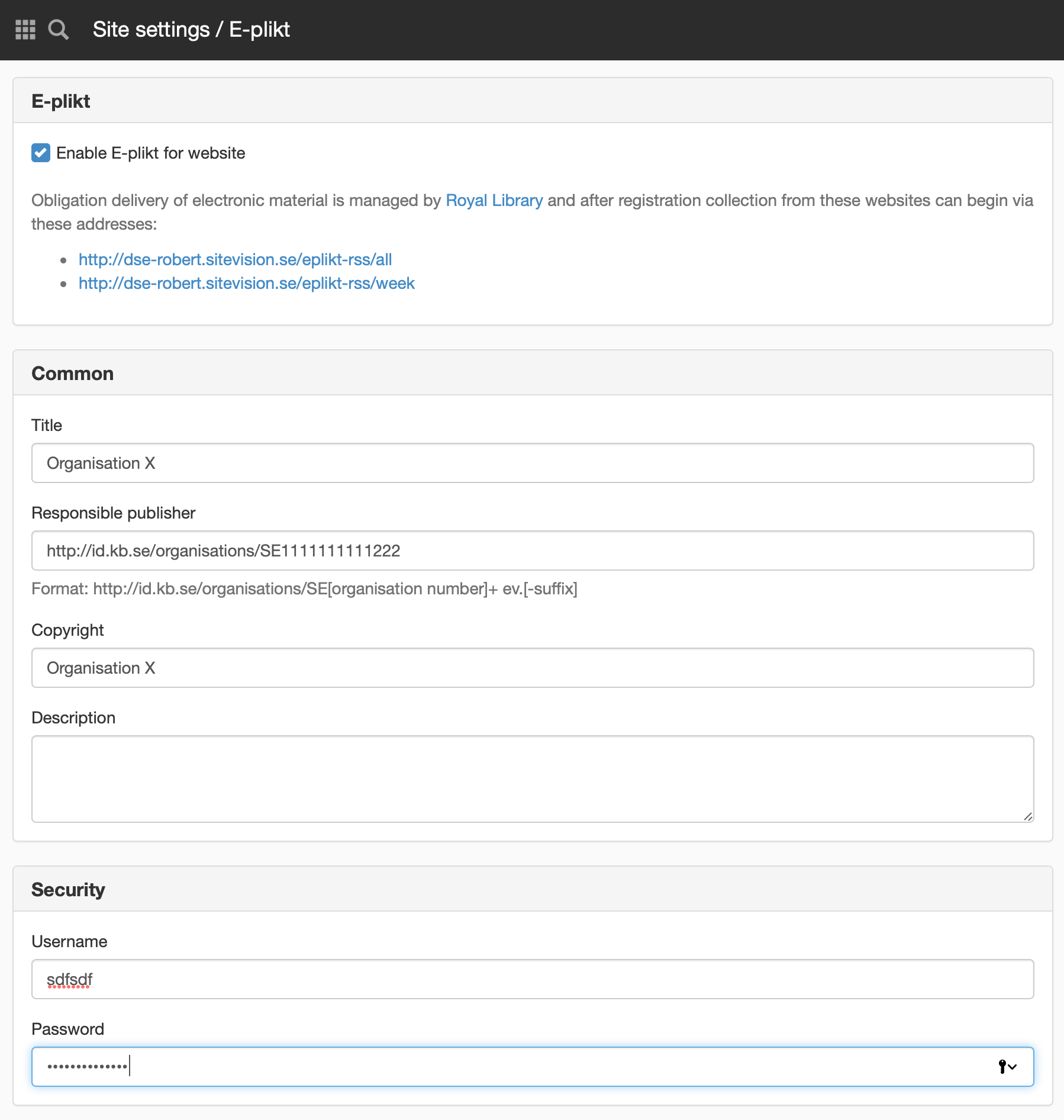
e-plikt
Enable e-plikt for website
Tick this box to enable e-plikt on the website. After completing the information below, editors with the "Publish for e-plikt" permission can choose whether to send pages when publishing as an e-plikt delivery. You can perform a test after enabling e-plikt and then publishing a page where you tick " Include in e-plikt delivery". The result is in the form of RSS and you can verify that it works by entering
- http://minwebb.sitevision.net/eplikt-rss/all - all deliveries
- http://minwebb.sitevision.net/eplikt-rss/week - last week’s delivery
What is included in the e-plikt delivery?
If you send a page, links to files in the body text are included with and in the metadata. However, if you have file sharing on the page, those files will NOT be included. Neither if you show links with custom script solution.
YouTube resources are not included, only files and images that are uploaded in SiteVision.
General
Title
Here you enter title.
Responsible publisher
Here you enter responsible publisher in the format http://id.kb.se/organisations/SE[organisationsummer]+ev.[-suffix]
Delete the square brackets and enter your organisation number. If you do not use the suffix delete +ev.[-suffix]
For questions regarding responsible publishers, please contact the National Library of Sweden.
Copyright
Here you enter copyright.
Description
Here you can enter a description if you wish.
Security
This is the username that the National Library of Sweden will use to connect to your website. They are only allowed access to the e-plikt delivery. This username and password must be communicated to the National Library of Sweden.
Username
Select a username to send to the National Library of Sweden.
Password
Select a password to send to the National Library of Sweden.
The e-plikt providers can administer their feeds on our site for registration and delivery https://e-plikt.kb.se/ . However, the National Library of Sweden does not have support for uploading feeds with passwords so you must therefore send username and password to the National Library of Sweden manually if you want to use e-plikt via Sitevision. E-mail to e-plikt@kb.se
E-plikt deliveries occur per primary domain. This means that any subsites, with an address other than the primary address, will be e-plikted with the primary address of the building, not with the secondary domain that the subsite responds to.
This function requires you to have a license for e-plikt.
The page published:
 Print page