

Publish - Structured Content tab
Under "Publish" > "Structured Content," the questions and answers that you have created manually or that the AI has helped you generate are displayed on the page. These are the ones that appear in the "Frequently Asked Questions" module.
As an editor, you are responsible for reviewing the suggestions and review results before publication.
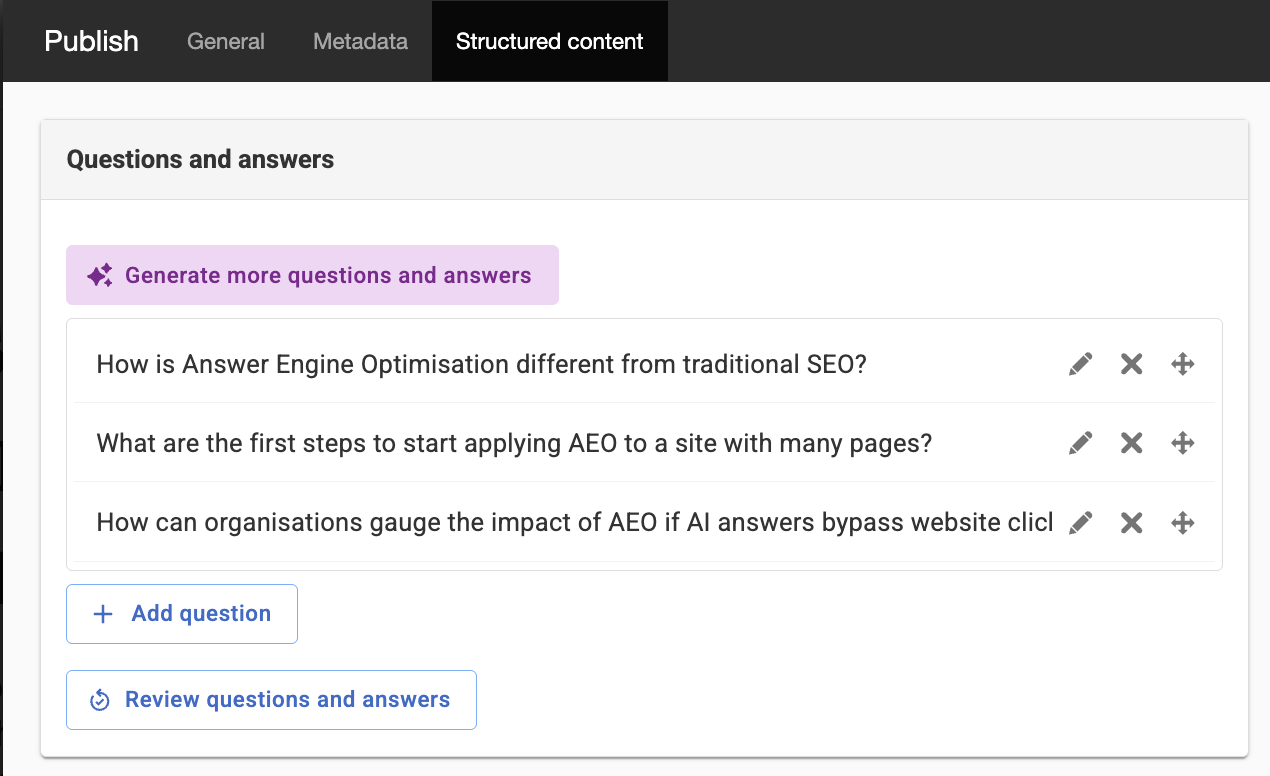
Generate More Questions and Answers
If you click on this question, more questions and answers may be generated. If new suggestions appear, they will be marked with a blue circle next to the question.
Add a Question
Here you can add a question and answer that you may be missing. But keep in mind that this might be because the information is missing from the page that the Questions and Answers section is based on—so it might be better to edit the text on that page.
Icons next to each question and answer
Edit Questions and Answers
Here you can edit existing questions and answers. However, keep in mind that it might be better to clarify the original text on the page so that the questions and answers are clearer.
Delete question and answer
Deletes the selected question and answer.
Move question and answer
Select the question and drag and drop it to the desired location.
Review Questions and Answers
Checks the questions and answers against the text on the original page and verifies whether they match. If everything looks good, you’ll receive the message “The structured content matches the page.”
This content is the same as what is displayed under Properties -> General -> Structured Content.
The page published:
 Print page
help.sitevision.se always refers to the latest version of Sitevision