

Paste clean
Paste clean can be found under the Tools icon in the toolbar.
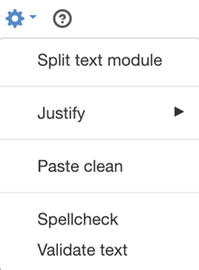
Här finns det inga inställningar utan här får du bara information om vilka kortkommandon du använder för att klistra in.

If you want to get links and other formatting, you can disable "Paste clean". To do this, select this option again.
Here are two examples of pasting results from a website:
Paste clean
Lorem Ipsum - All the facts - Lipsum generator
sv.lipsum.com/
Please translate this page
Lorem Ipsum is a dummy text from the printing and publishing industry. Lorem Ipsum has been default since the 1500 century, when an unknown typesetter took a number of...
Lorem Ipsum
Reference site about Lorem Ipsum, giving information on its origins ...
Lorem ipsum dolor sit amet
Lorem ipsum dolor sit amet, consectetur adipiscing elit ...
More results from lipsum.com»
Lorem ipsum – Wikipedia
sv.wikipedia.org/wiki/Lorem_ipsum
In print production and graphic design, Lorem Ipsum is used as an example text to show what a document will look like once it...
Paste normal (with formatting)
- Lorem Ipsum - All the facts - Lipsum generator
sv.lipsum.com/
Please translate this pageLorem Ipsum is a dummy text from the printing and publishing industry. Lorem Ipsum has been default since the 1500 century, when an unknown typesetter took a number of...
Lorem IpsumReference site about Lorem Ipsum, giving information on its origins ... Lorem ipsum dolor sit ametLorem ipsum dolor sit amet, consectetur adipiscing elit ... More results from lipsum.com» - Lorem ipsum – Wikipedia
sv.wikipedia.org/wiki/Lorem_ipsum
In print production and graphic design, Lorem Ipsum is used as an example text to show how, for example, a document will look once it...
The page published:
 Print page
help.sitevision.se always refers to the latest version of Sitevision